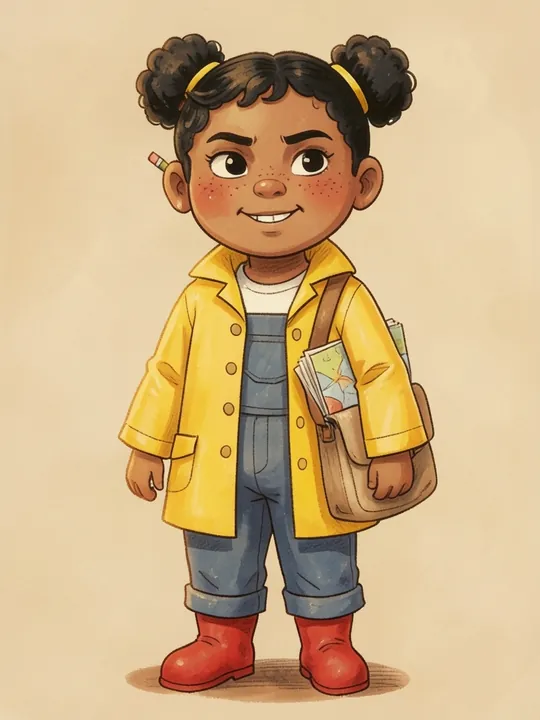
Give the character a name, say what they are, and describe how they look in one line of colours and clothes, like “a small girl in a yellow raincoat and red boots”. InkStak writes the rest of their description and paints a portrait, so the character looks the same in every picture of every story.
Updated
When should you describe a character in words?
The character is imaginary: a dragon who is afraid of the dark, a robot who wants to bake.
You’d rather not upload a photo of your child.
You want to start right away. Six ready-made characters are one tap away: a scientist, a princess, an otter, a weather robot, a young explorer and a small dragon.
Open the Characters tab. To start from a ready-made character, press Add on one and change anything you like. To make your own, tap + New Character.
Fill in the three required fields: a Name, what they are in Species / type (“frog”, “dragon”, “little girl”), and one line in What they look like.
Give them some life, if you like: Personality, Special quirks, Favourite things and a Backstory. Leave the backstory empty and tap Generate to have one written, or write a few lines and tap Elaborate.
Want to see them first? Tap Generate Image for a portrait. Type a hint such as “add a red scarf” and tap Regenerate Image to change it.
Tap Save Character. InkStak writes the Character Bible, checks it against the image safety rules and paints the portrait. Keep the tab open until it finishes.
Open the character and expand Character Bible. It spells out the look one feature at a time: what they are, age, body type, face, skin or fur, eyes, hair, distinguishing features, outfit, accessories and carried item. Change anything you want before their first story: after that, everything but the outfit, accessories and carried item is locked, so every book matches.
How to describe a character so they draw well
Things you can see. Colour, shape, material and pattern: “yellow raincoat, red boots, blue dungarees”. Words like “magnificent”, “slightly” or “ornate” don’t change the picture. When a field has some, InkStak offers a Simpler version.
One signature outfit. The same clothes in every picture are what make a character easy to spot on every page. You can change the outfit later.
Two or three distinguishing features. Freckles, a gap-toothed grin, a pencil behind one ear.
Things they hold go in Carried item. A wand or an umbrella there appears when the story uses it. Under Accessories, it would be in their hand in every picture.
A personality with a catch. “Brave but hates getting wet” gives a story something to work with.
The most important backstory first. Every story uses the start of it; longer chapter books use all of it.
Gender sets the pronouns, not the picture. The picture follows the description, so say “girl” or “boy” in Species / type if it matters.
An example: Wren
Wren is one of InkStak’s ready-made characters. This is everything typed in to make her:
Name
Wren
Species / type
Human
What they look like
A small girl in a yellow raincoat and red boots, with two black puffs of hair and a canvas satchel of folded paper.
Personality
Observant, methodical, quietly certain, set on exploring somewhere
Special quirks
Paces out distances under her breath
Favourite things
Paper, string, and knowing exactly where things are
Her Character Bible spells the look out, field by field. A few of them:
Hair / mane / feathers
Black curls in two puffs, tied with yellow ribbon
Skin / fur / scale tone
Warm brown with freckles across the nose
Distinguishing features
Gap-toothed grin, freckles, a pencil behind one ear
Signature outfit
Yellow raincoat with a hood, red rubber boots, blue dungarees
No. Three things are required: a name, what the character is, and one line about how they look. InkStak writes the rest of their description and paints their portrait.
Describe things that can be drawn, give them one signature outfit, and check the Character Bible before their first story. The Character Bible and the portrait together keep them the same from page to page.
The outfit, accessories, carried item and gender can change at any time. The rest of the look locks once the character is in a story, so earlier books still match.